
In this post I am going to talk about a common place tool used by many people in the IT field to hone their craft. That tool is the home lab. I will go through some different types of home lab that you can tailor yours to as well as what I am currently building.
Navigation
What is a Home Lab?
Types of Home Lab
My Own Home Lab
What is a Home Lab?
A home lab isn’t anything specific. It is just an umbrella term for a system or environment that you can use to improve you knowledge and skills in installing, configuring and optimising IT. For the most part a home lab will replicate the kind of environment you are used to dealing with day to day in your career. Typically it is used to build a smaller scale enterprise or business environment.
There is no set way to build a home lab or way to use one. It is all entirely your personal preference. If you want to build a fully fledged enterprise network with full domain services then have at it. Or if you just want the bare bones basics so you can play with new technologies then that’s perfect also.
The complexity of it all comes down to;
- How much time you want to invest to get up and running
- What your learning goals are
- Your budget
Types of Home Lab:
This is not an exhaustive list but here are some types of home lab:
- Network – focuses on the network infrastructure of an enterprise network
- Services – focuses on the services provided in an enterprise network
- Cybersecurity – focuses on enterprise cybersecurity. Could be; blue, red or both
- Virtualisation – focuses on virtualisation with VMs, containers and container orchestration
As I said earlier what you end up building for your home lab is entirely dependent on your goals. You could end up with a hybrid of multiple types.
Hardware
This is the physical hardware you will use to run your home lab. The hardware you choose for your home lab will depend on a few things; your budget, what you already have available and the scope of your home lab.
Budget – there’s nothing stopping you going out and buying thousands of pounds worth of server to run your home lab. But lets be realistic I’m sure everyone wants to achieve as much as possible with as little monetary cost as possible.
What you already have – if you have an old gaming PC you don’t use anymore that could definitely suffice for building a home lab. Even if you have just a regular old PC that you don’t use, if it still has some relatively modern specs then it could get you up and running in no time.
Scope – if your home lab will only every be a really small scope then you really don’t need much in the way of hardware specs. However, if you think it will grow as you explore more and more technologies then maybe consider something more powerful.
A great recommendation would be to look at old enterprise servers. You can pick up some fairly well spec’d rack mount servers for fairly cheap if you hunt on sites like eBay. But then you have to deal with the downsides of having a rack mounted server such as; space, heat, noise and electrical consumption.
Virutalisation
To get the most out of your home lab virtualisation is a keen ally. Virutalisation will allow you to get as much as possible out of the hardware that you choose to use. Hardware will have an impact on this because in order to be able to use most hypervisors you will require a CPU that can work with hypervisors.
Depending on the hardware you selected you might want to look at either Type 1 or Type 2 hypervisors:
- Type 1 – the hypervisor is installed directly onto server hardware – e.g VMware ESXI or Proxmox
- Type 2 – the hypervisor is installed and interacted with through a guest OS – e.g VMware Workstation Player or Oracle VirtualBox
Budget is the biggest decider on the virutalisation option you go for!
Strict budgets would best work with open source options such as Proxmox or XCP-ng.
Less strict budgets could look to using VMware ESXI. You do get an evaluation license for 60 days but after that you will need to buy the license.
My Own Home Lab:
So onto the real reason I have made this post I am indeed building my own home lab.
My goal for this is to build up my knowledge of the services run on an enterprise/business network and then once it is all built and work to start to play around to hone my cybersecurity skills working with both red and blue tools. Also, I would like to start learning more about containers and container orchestration with technologies like Kubernetes or Docker Swarm.
Hardware
For the hardware of the home lab I have gone with an old Dell Poweredge R720 rackmount server.
Virutalisation
For the virtualisation I have gone for Proxmox the open source type 1 hypervisor. This is providing the base for all my other services to be built on.
Network and Services Topology
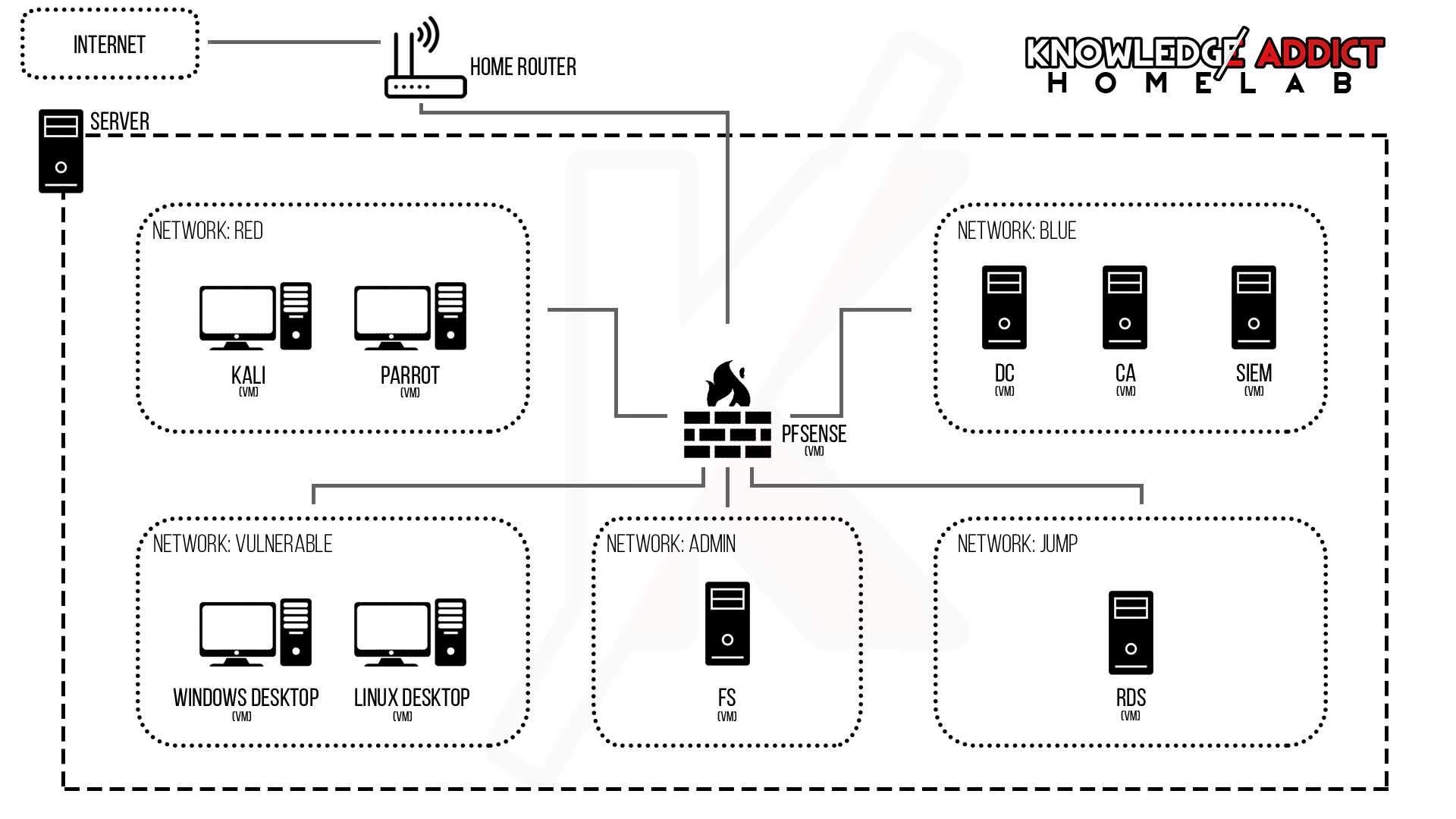
Below you can see the network and services topology for the home lab. This will change and expand as time goes on, but its a goo starting point.
Networks and Services:
- Blue:
- DC – Domain Controller – running Windows Active Directory
- CA – Certificate Authority – Windows server running as the root CA for the home lab domain
- Red:
- Kali – VM running a Kali image to give access to common red tools
- Parrot – VM running a Parrot image to give access to common red tools
- Admin:
- FS – File Share – common place to store files within the domain
- Jump:
- RDS – Remote Desktop Services – a Windows
- Vulnerable:
- Windows Desktop – VM running a Windows desktop image that is joined to the domain
- Linux Desktop – VM running a Linux desktop image that is joined to the domain
 Knowledge Addict
Leave a comment