
Time to read:
In this post, we are going to go over how to install Terraform on RedHat. More specifically I will be installing it on a Fedora 40 server image.
NOTE: if you are using a web proxy between your server and the internet then make sure that you allow the ‘.hashicorp.com’ and ‘.terraform.io’ domains through the proxy.
NOTE: if you are using a system that isn’t Fedora 40 you can find the commands needed to install Terraform on your specific system here.
SECTION I – Terraform
Terraform is an infrastructure automation software that allows you to utilise the concept of Infrastructure as Code (IaC). The main advantages of using Terraform are:
- Multi-platform – works on Linux, MAC and Windows.
- Previews – allows preview of infrastructure changes before they are implemented.
- Parallelisation – allows parallelisation of operations.
- Integrations – integrates large number of providers/applications. – https://registry.terraform.io/browse/providers
IaC is the process of writing the code for the provisioning and configuration steps of the infrastructure components to help automate its deployment in a repeatable and consistent manner.
The benefits of IaC are:
- Standardisation of infrastructure configuration – less risk of errors.
- Version controlled code stored in a source code manager.
- code integrated into Continuous Integration/Continuous Development pipelines.
- Faster and more efficient infrastructure changes.
- Better management and control of infrastructure with reduced costs.
Terraform is a declarative type of IaC meaning that in the code you put what you want the final state of the infrastructure to be and Terraform will get the current state of the infrastructure and then make any changes required to make it equal the desired state.

FIGURE 1 – Terraform
SECTION II – Installation
Before starting the installation we need to make sure DNF core plugins is installed using the following command:
dnf install dnf-plugins-core
Now we can add the repository for Terraform to DNF using the following command:
dnf config-manager --add-repo https://rpm.releases.hashicorp.com/fedora/hashicorp.repo
Finally, we can do ahead and use DNF to install the Terraform package:
dnf install terraform
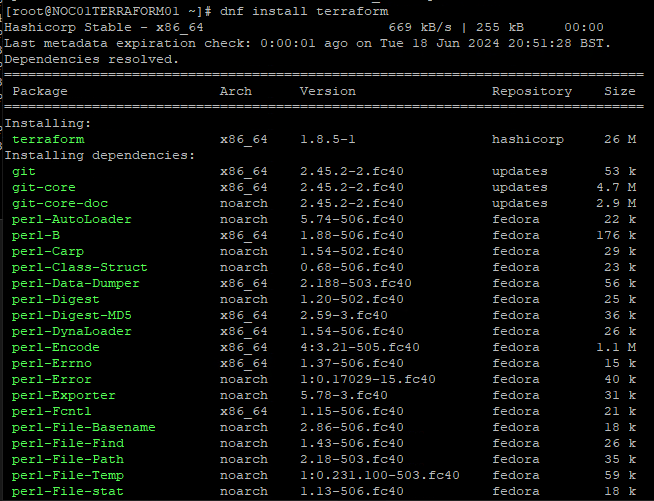
FIGURE 2 – Install Terraform
SECTION III – Confirmation
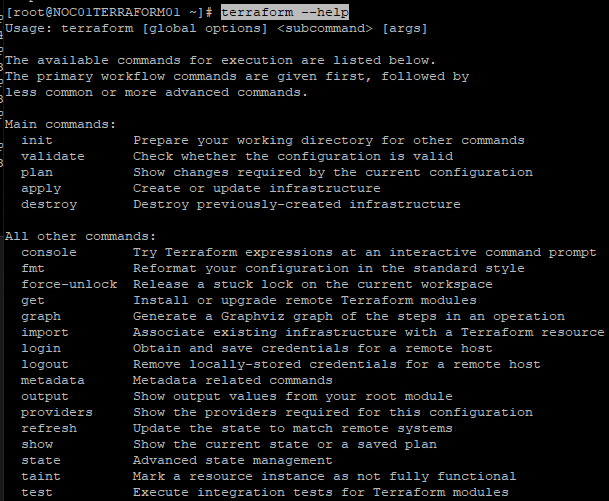
Now that we have Terraform installed we need to make sure that it is working properly.
An easy way to make sure Terraform is working is by checking the help page. This can be done with the following command:
terraform --help
 Knowledge Addict
Leave a comment