

Introduction
Running an implementation of Git within your homelab environment can be a great thing to do. Any code you write or anything that needs to be version controlled can be stored centrally within your Git implementation.
In this post, we are going to go through what Git even is, some ways you can utilise it and the version I have decided to go with, in my own homelab environment.
Section I – What is Git?
Git is a tool originally created by Linus Tarvold when he was creating Linux. When he and the community were developing the Linux kernel there was going to be lots of lines of code that would need tracking and a simple, fast, version controlled and collaborative way to support its code development was needed. Originally, in the Linux kernel creation this was handled by BitKeeper, a close-sourced tool, provided as it was good advertisement for the tool itself. Linus wrote Git as the open-sourced answer to it after getting into some bother when BitKeeper was reverse engineered. Once initially created it wasn’t long until Git was tracking itself and you can even now view the original Git commit messages.
“git” can mean anything, depending on your mood.
– random three-letter combination that is pronounceable, and not actually used by any common UNIX command. The fact that it is a mispronunciation of “get” may or may not be relevant.
– stupid. contemptible and despicable. simple. Take your pick from the dictionary of slang.
– “global information tracker”: you’re in a good mood, and it actually works for you. Angels sing, and a light suddenly fills the room.
– “goddamn idiotic truckload of sh*t”: when it breaks
Git is tool commonly used by programmers as a way to create version controlled code that can be stored centrally within a repository. The powers of Git are far more than I know how to exploit properly. I use it as a way to version control any of my homelab code projects from Teraform to Ansible and more.
Section II – Why Bother Self Hosting It?
So we have a rough idea of what Git is, now how can you actually go about using it? You can use Git itself as a Command Line Interface (CLI) tool and track your directories on a local machine. The true power comes when we start talking about remote repositories. This means I can use Git to push my code to a central storage location and then pull that down on any machine with Git installed and carry on working on the same code.
A common Git implementation that most people have heard of it Github. This is a Git implementation hosted on the internet. Just set up an account on their servers and away you go. Github could be a great option for your homelab if you allow it to have full internet connectivity because you can store the code on the Github servers and not have to worry about redundancy or losing the code.
But, lets be real, if you are already down the infinite rabbit hole of making a homelab do you want to use a public hosting service. Maybe you do?
For me I allow restricted access to the internet from my homelab via a forward web proxy (using Squid proxy) and I wanted to keep all the code relevant to the homelab on the homelab itself. I won’t lie, this is something I have had problem with before when I murdered the Gitlab instance I was running and lost all my Fedora server Ansible baselines. So I will say this now, make sure you think about backups if you self-host it. It could save you a headache in the future, homelabs are about exploring and learning not having to redo the donkey work you already did. Well I guess it was a learning experience, so not all bad.
Section III – Self Hosting Options
If we want to self-host a Git implementation what are the options. Going full fledged you can install Gitlab Community Edition (CE) on a server or more than likely a Virtual Machine (VM). If you want to explore the container versions you could run Gitlab CE within a Docker container. Finally, you could run Gitea within a Docker container. NOTE: There are other options, I just like these 3 ways of doing it.
Gitlab boasts a feature rich experience. Whether you go for the Docker version or the full installation you can still get the same experience. Some of those features include; planning, code management, CI/CD, security, observability and compliance. But, it does come with a large downside that I didn’t appreciate until I tried to run it on my smaller server. It tends to be quite heavy and eat through resources. Below its an image of when I was running Gitlab CE in a Docker container on my Promxox server. You can see its fairly resource heavy and if you are running with limited compute then maybe the alternative I went for is a better option.

Section IV – Why Gitea?
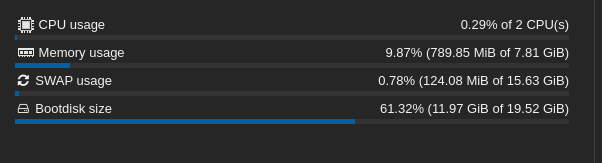
Lets talk about the relative new comer to self-hosted Git implementation landscape. Gitea is still a self-hostable Git implementation that you can run within a Docker container. Like Gitlab CE, it does boast a lot of useful features including; planning, code management, CI/CD, security. However, it has one amazing feature that I like for my homelab….It’s lightweight. Below is a snapshot of my same Docker server running the Gitea container and you can see how little resource is being used when compare to Gitlab CE.
Section V – Wrap Up
Let’s wrap up, I think deploying a Git implementation in your homelab is a great idea. It will provide you an easy way to maintain version controlled code in a centralised way that you can use to maintain your homelab or your coding projects. If you opt to self-host it, the experience you get with Gitea will be perfect and you can know that it will only sip away at a tiny amount of resources leaving the rest for what you actually want to use it for.
 Knowledge Addict
Leave a comment